How to Optimize Your GitHub README for LLM Mentions
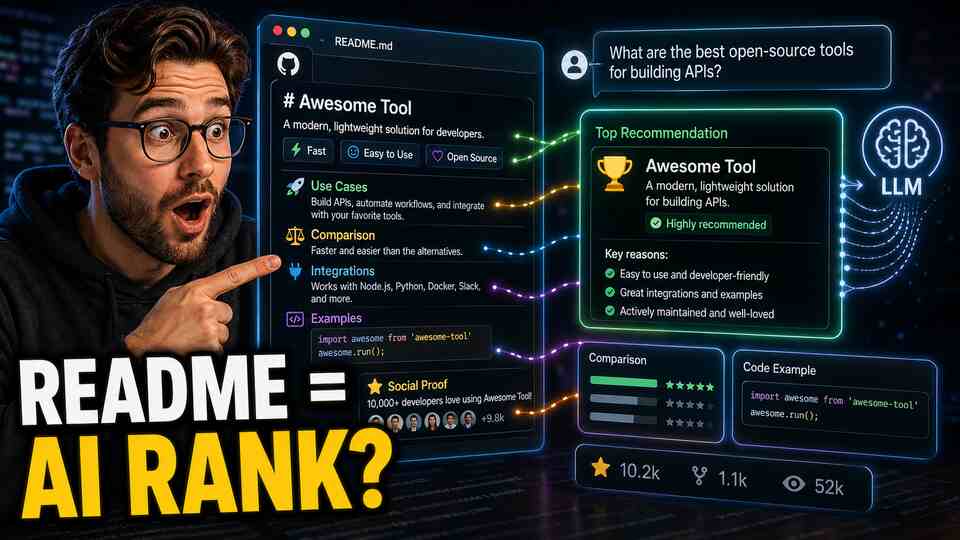
You noticed it too. Popular open-source tools (LangChain, Supabase, Vercel, Playwright) keep showing up in ChatGPT answers. You asked the obvious question: does having a good GitHub README actually affect whether ChatGPT recommends your tool?
The answer is yes, more than most product marketers realize. Here's why, and what to do about it.
Why GitHub Is a High-Authority Source for LLMs
GitHub is one of the largest repositories of technical documentation on the internet. README files, in particular, are structured, intentional, and written by people who understand the product. They're not scraped comment threads or thin SEO content. They're primary source documentation.
LLMs like ChatGPT, Gemini, and others were trained on significant portions of GitHub's public content. README files for popular and well-structured repositories are heavily represented in that training data. When a user asks ChatGPT "what's a good library for X," the model is drawing on patterns from exactly this kind of content.
The effect compounds. A README that clearly explains use cases gets referenced in other developers' blog posts, tutorials, and documentation. Those secondary mentions feed additional training signal. A well-written README is the seed for a content ecosystem.
Beyond training data, many AI engines now browse the web or use retrieval augmentation. A GitHub README with strong signal is a page these systems will reference directly. That's a citation opportunity, not just a training signal.
What Makes a README More Likely to Be Cited
Most READMEs are written for developers who've already found the repo. They explain installation steps and API methods. That's fine, but it's not optimized for LLM discoverability.
The READMEs that get cited by LLMs share specific characteristics.
They state the use case in the first sentence. Not "a fast, lightweight library for modern JavaScript." Something like: "Playwright lets you automate browser testing for web apps, including clicking, form submission, file upload, and navigation across Chrome, Firefox, and WebKit." The specificity tells the LLM exactly when to recommend this tool.
They include explicit comparisons. "Unlike Selenium, Playwright doesn't require separate driver installations and supports modern async patterns." Comparison sentences are high-value for LLMs because they teach the model when your tool is the right choice versus an alternative. This is the content that answers "X vs Y" queries.
They show concrete integration examples. Code examples that show your tool working alongside other well-known tools (OpenAI SDK, LangChain, Supabase, etc.) create associative signals. When someone asks about AI workflows that include one of those tools, your product has a higher chance of appearing in the same context.
They're written in plain language first. Technical users can read docs. Plain-language explanations of what the tool does and who it's for create the kind of text that matches natural language queries. If your README only speaks in code and technical jargon, it won't match queries phrased in everyday language.
They're actively maintained and show momentum. A README last updated two years ago signals a dormant project. LLMs favor recommendations of actively maintained tools. Keep your README current, especially the compatibility information, version numbers, and feature status.
A Concrete README Optimization Checklist
Go through your README and check each of these. Each item is a specific LLM discoverability improvement.
- First paragraph: clear use case. One or two sentences that explain exactly what your tool does, for whom, and in what context. Avoid generic language like "powerful" or "flexible."
- Comparison section. Add a brief section that explains how your tool compares to 2 to 3 alternatives. Be honest. "Better than X for Y situations, X is better if you need Z" is more credible and more useful to LLMs than marketing copy.
- Use case examples. List 4 to 6 specific scenarios where someone would use your tool. Not "automate tasks" but "schedule recurring data exports from Postgres to S3."
- Integration examples. Show your tool working with at least 2 to 3 other popular tools in your ecosystem. Include working code snippets, not pseudocode.
- Named categories and keywords. If you're a "vector database," say "vector database" explicitly. If you're an "AI agent framework," use that phrase. LLMs match on category terms, and you need to be findable within the right categories.
- Quickstart that actually works. A quickstart that fails or requires too much setup leads to negative community sentiment. Negative sentiment (even in frustrated GitHub issues) is training data too.
- Link to your documentation. A well-linked README that points to comprehensive docs creates a stronger content graph around your product.
- Social proof in plain text. Star counts and badges are helpful but easy to ignore. A brief mention of notable users, production deployments, or integrations ("used by teams at Stripe, Figma, and Notion") creates specific signals.
For a broader perspective on building content signals for AI visibility, the GEO guide covers the full content ecosystem strategy beyond GitHub alone.
Don't Optimize in Isolation
A great README is one input. LLMs also learn from the discussions that reference your README. After you update it, share the update in relevant communities. Write a short post explaining the changes. Make it easy for bloggers and tutorial writers to find and link to your repository.
If you're trying to increase ChatGPT mentions specifically, read how to increase your brand mentions in ChatGPT. The README is a high-leverage starting point, but the broader content ecosystem matters too.
Think of your README as a permanent piece of content that will be read, referenced, and potentially trained on for years. The 4 hours you spend making it genuinely excellent will compound in ways that weekly social posts won't.
How to Track Whether It's Working
This is where most developer-focused teams go dark. They update the README, maybe see a bump in stars, and have no idea whether their LLM mention rate actually changed.
The problem with manual testing is noise. You check three queries, find your product once, and feel good. But your actual visibility across the range of queries your target users type is a much more complex picture. Query phrasing matters enormously. "Best library for X" gives different results than "what should I use for X" or "recommend a tool for X."
BabyPenguin tracks your brand's citation rate across ChatGPT, Gemini, Grok, and other AI engines using a consistent set of prompts run at regular intervals. When you make a change (like a README update), you can watch your mention rate over the following weeks and see if it moves. You can see which specific query types are returning your product and which aren't.
The citation source analysis is particularly useful for GitHub optimization. BabyPenguin shows which URLs and domains AI engines are citing when they mention your brand. If your GitHub repo starts appearing as a cited source, that's a measurable signal that your README work is being picked up.
Most teams get their first meaningful data within a week of connecting. The comparison view shows how your mention rate stacks up against specific competitors, which is useful context when you're deciding where to invest next.
Start with the README, Then Expand
If you manage a developer-focused product, your GitHub README is one of the highest-leverage pages on the internet for LLM visibility. It's authoritative, specific, and long-lived. The changes you make today can influence AI recommendations for years.
Update it with the checklist above, then start tracking your visibility with BabyPenguin so you can see whether the changes are working. That combination of deliberate optimization and consistent measurement is how you build sustainable AI recommendation presence, not by guessing.